If you’re working with Genetec Security Center but don’t fully understand how all components interact, you’re not alone.
Many technicians and system integrators configure systems without a clear understanding of the Genetec architecture, which often leads to design issues, poor performance, and difficult troubleshooting.
In this guide, you’ll learn exactly how Genetec Security Center architecture works—step by step, in a practical and easy-to-understand way.
Watch the Video Tutorial
What Is Genetec Security Center Architecture?
Genetec Security Center architecture is a modular, role-based system that integrates access control, video surveillance, and other security components into one unified platform.
It is built on a three-layer architecture:
- Client Layer
- Server Layer
- Hardware Layer
Understanding this structure is essential for designing scalable and reliable security systems.
Genetec Architecture Overview (The Big Picture)
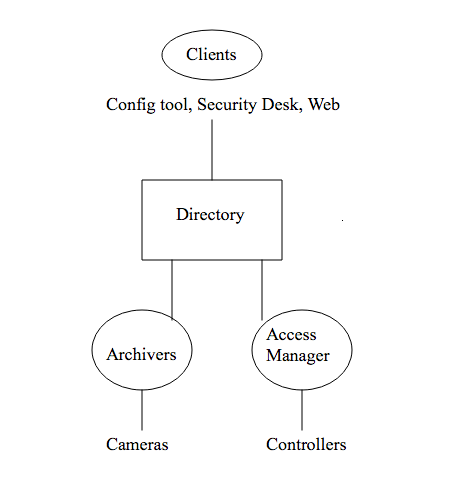
At a high level, Genetec separates responsibilities into three layers:
1. Client Layer (User Interface)
This is where users interact with the system.
Main applications:
- Security Desk (monitoring and operations)
- Config Tool (configuration and administration)
- Web Client (remote access)
2. Server Layer (Core Processing)
This is the brain of the system where all decisions are made.
Key server roles:
- Directory Server
- Access Manager
- Archiver (Video Services)
3. Hardware Layer (Field Devices)
This includes all physical security equipment:
- Access control panels and card readers
- Door locks and sensors
- IP cameras and encoders
All layers communicate over TCP/IP networks.
Core Genetec Server Roles Explained
Directory Server (Most Critical Component)
The Directory Server is the foundation of the Genetec system.
Responsibilities:
- System configuration and database
- User authentication and permissions
- License management
- Federation between systems
⚠️ Important: If the Directory Server goes down, the entire system is affected.
Best practice:
Use dedicated hardware and implement redundancy in enterprise environments.
Access Manager (Access Control Logic)
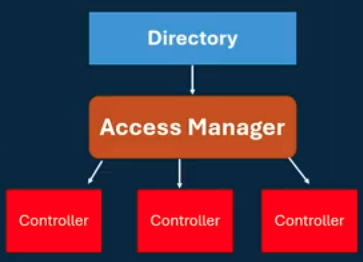
The Access Manager is responsible for all access control decisions.
What it does:
- Communicates with controllers
- Validates credentials
- Applies access rules and schedules
- Handles anti-passback
- Processes real-time events
Real-world example:
When someone badges at a door:
- Controller reads the card
- Sends data to Access Manager
- Access Manager checks permissions
- Sends back grant or deny
This happens in milliseconds.
For a deeper understanding of how credentials are structured in enterprise systems, see:
👉 Access Control Credentials Explained — Strategy vs Technology
Archiver (Video Management Server)
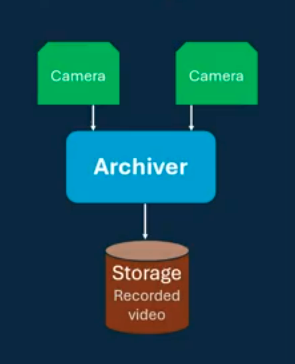
The Archiver handles video recording and streaming.
Key functions:
- Connects to IP cameras
- Records and stores video
- Manages live and playback streams
- Supports analytics and motion detection
Design tip:
Storage and performance depend on:
- Camera count
- Resolution
- Frame rate
- Retention period
Genetec Role-Based Architecture (Why It’s Powerful)
Genetec uses a modular role-based architecture, meaning each function runs as a separate role.
Benefits:
- High flexibility
- Easy scalability
- Better performance optimization
- High availability options
Deployment Examples:
Small systems
- All roles on one server
Medium systems
- Roles split across multiple servers
Enterprise systems
- Fully distributed with redundancy
👉 You can start small and scale without redesigning your system.
Additional Genetec Roles
Genetec includes many optional roles to extend functionality:
- Incident Manager (alarm workflows)
- Map Manager (maps and visualization)
- Media Router (stream optimization)
- Report Manager (automated reporting)
- Federation (multi-site systems)
These roles are installed only when needed.
Genetec Client Applications
Security Desk
Used for:
- Monitoring video and alarms
- Controlling doors and cameras
- Viewing events in real time
Config Tool
Used for:
- System configuration
- Device setup
- User management
Web Client
Provides:
- Remote access
- Mobile-friendly interface
- Basic monitoring features
Hardware Layer Explained
Access Control Devices
- Controllers (Mercury, Synergis)
- Card readers
- Door hardware (locks, REX, contacts)
Video Devices
- IP cameras
- PoE or powered devices
- Network-connected to Archiver
How Genetec Works (Real Data Flow Example)
Here’s a typical access control transaction:
- User badges at a reader
- Controller sends credential to Access Manager
- Access Manager checks permissions in Directory
- Decision is sent back
- Door unlocks or denies access
- Event appears in Security Desk
⏱ Total time: ~200 milliseconds
Common Genetec Design Mistakes to Avoid
Avoid these common issues when designing a system:
- Placing Directory on a shared server in large deployments
- Underestimating video storage requirements
- Poor network design between controllers and servers
- No redundancy for critical roles
- Overloading a single Archiver
Read Genetec Architecture checklist post
Why Understanding Genetec Architecture Matters
Knowing how Genetec architecture works helps you:
- Design scalable systems
- Troubleshoot faster
- Improve system performance
- Plan future expansions
FAQ – Genetec Architecture
What is the most important component in Genetec?
The Directory Server is the most critical component because all roles depend on it.
Can Genetec run on a single server?
Yes, small systems can run all roles on one server.
What does the Archiver do?
It records, stores, and streams video from cameras.
How does Access Manager work?
It processes credentials and decides whether access is granted or denied.
Conclusion
Genetec Security Center architecture may seem complex at first, but once you understand its structure, everything becomes much clearer.
With its three-layer design and role-based architecture, Genetec offers a powerful, flexible, and scalable security platform.
Whether you’re installing, designing, or troubleshooting a system, mastering this architecture gives you a clear advantage in the field.
Now you have a complete understanding of Genetec architecture—use it to design smarter, more reliable systems.
Want to see how these components come together inside a live Genetec Security Center environment? Watch the full Genetec Security Center overview for a practical walkthrough of the interface, core modules, and system interactions. This covers the Security Desk interface, Config Tool navigation, system roles, and module interactions to help you connect the architectural concepts to real-world operation.
Read also How to structure access control on Genetec
You may also like Evolution of access control credentials
See other information on genetec .com